

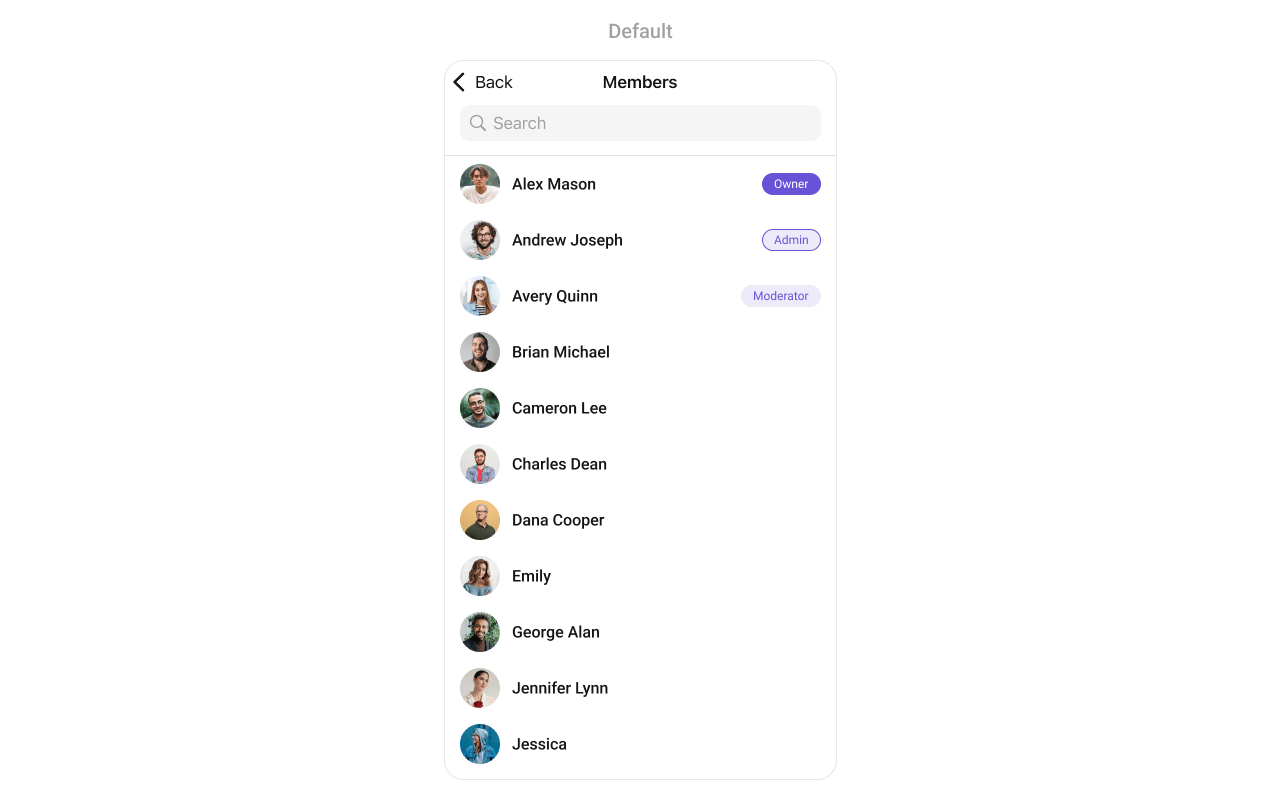
CometChatGroupMembers component displays all members of a group with their roles (owner, admin, moderator, participant). It supports member management actions like kick, ban, and role changes based on the logged-in user’s permissions.
AI Integration Quick Reference
AI Integration Quick Reference
{
  "component": "CometChatGroupMembers",
  "package": "CometChatUIKitSwift",
  "import": "import CometChatUIKitSwift\nimport CometChatSDK",
  "description": "Displays all members of a group with their roles and supports member management actions like kick, ban, and role changes.",
  "inherits": "UIViewController",
  "primaryOutput": {
    "callback": "onItemClick",
    "type": "(GroupMember, IndexPath) -> Void"
  },
  "props": {
    "data": {
      "group": {
        "type": "Group",
        "required": true,
        "note": "The group whose members to display"
      },
      "groupMembersRequestBuilder": {
        "type": "GroupMembersRequest.GroupMembersRequestBuilder?",
        "default": "nil",
        "note": "Custom request builder for filtering members"
      }
    },
    "callbacks": {
      "onItemClick": "(GroupMember, IndexPath) -> Void",
      "onItemLongClick": "(GroupMember, IndexPath) -> Void",
      "onBack": "() -> Void",
      "onSelection": "([GroupMember]) -> Void",
      "onSelectedItemProceed": "([GroupMember]) -> Void",
      "onError": "(CometChatException) -> Void",
      "onEmpty": "() -> Void",
      "onLoad": "([GroupMember]) -> Void"
    },
    "visibility": {
      "hideSearch": { "type": "Bool", "default": false },
      "hideNavigationBar": { "type": "Bool", "default": false },
      "hideBackIcon": { "type": "Bool", "default": false },
      "hideUserStatus": { "type": "Bool", "default": false },
      "hideKickMemberOption": { "type": "Bool", "default": false },
      "hideBanMemberOption": { "type": "Bool", "default": false },
      "hideScopeChangeOption": { "type": "Bool", "default": false },
      "hideErrorView": { "type": "Bool", "default": false },
      "hideLoadingState": { "type": "Bool", "default": false }
    },
    "selection": {
      "selectionMode": { "type": "SelectionMode", "default": ".none" }
    },
    "styling": {
      "avatarStyle": { "type": "AvatarStyle", "default": "AvatarStyle()" },
      "statusIndicatorStyle": { "type": "StatusIndicatorStyle", "default": "StatusIndicatorStyle()" }
    },
    "viewSlots": {
      "listItemView": "(GroupMember?) -> UIView",
      "leadingView": "(GroupMember?) -> UIView",
      "titleView": "(GroupMember?) -> UIView",
      "subtitleView": "(GroupMember?) -> UIView",
      "trailView": "(GroupMember?) -> UIView",
      "emptyStateView": "UIView",
      "errorStateView": "UIView",
      "loadingStateView": "UIView"
    }
  },
  "methods": {
    "swipeActions": {
      "set(options:)": "((Group, GroupMember?) -> [CometChatGroupMemberOption])? - Sets custom swipe actions",
      "add(options:)": "((Group, GroupMember?) -> [CometChatGroupMemberOption])? - Adds additional swipe actions"
    },
    "dataManipulation": {
      "add(groupMember:)": "GroupMember - Adds a member to the list",
      "update(groupMember:)": "GroupMember - Updates a member in the list",
      "remove(groupMember:)": "GroupMember - Removes a member from the list",
      "insert(groupMember:at:)": "GroupMember, Int - Inserts a member at a specific index",
      "clearList()": "Void - Removes all members from the list",
      "size()": "Int - Returns the number of members in the list"
    }
  },
  "events": [
    {
      "name": "ccGroupMemberKicked",
      "payload": "{ user: User, group: Group }",
      "description": "Fires when a member is kicked"
    },
    {
      "name": "ccGroupMemberBanned",
      "payload": "{ user: User, group: Group }",
      "description": "Fires when a member is banned"
    },
    {
      "name": "ccGroupMemberScopeChanged",
      "payload": "{ user: User, group: Group, scope: MemberScope }",
      "description": "Fires when a member's scope is changed"
    }
  ],
  "sdkListeners": [
    "onGroupMemberKicked",
    "onGroupMemberBanned",
    "onGroupMemberUnbanned",
    "onGroupMemberScopeChanged",
    "onMemberAddedToGroup"
  ],
  "compositionExample": {
    "description": "GroupMembers is typically accessed from group details or settings",
    "components": ["CometChatGroups", "CometChatGroupMembers", "CometChatMessages"],
    "flow": "User opens group → views members → taps member → starts direct chat"
  },
  "types": {
    "GroupMember": {
      "uid": "String",
      "name": "String",
      "avatar": "String?",
      "scope": "MemberScope",
      "joinedAt": "Int"
    },
    "MemberScope": {
      "owner": "Group owner with full permissions",
      "admin": "Administrator with management permissions",
      "moderator": "Moderator with limited management",
      "participant": "Regular member"
    }
  }
}
| Field | Value |
|---|---|
| Component | CometChatGroupMembers |
| Package | CometChatUIKitSwift |
| Inherits | UIViewController |
Where It Fits
CometChatGroupMembers displays all members of a specific group. It’s typically accessed from group details or settings screens.
import UIKit
import CometChatUIKitSwift
import CometChatSDK

class GroupDetailViewController: UIViewController {

    var group: Group!

    override func viewDidLoad() {
        super.viewDidLoad()
        setupGroupMembers()
    }

    private func setupGroupMembers() {
        let groupMembers = CometChatGroupMembers(group: group)

        // Handle member tap - start direct chat
        groupMembers.set(onItemClick: { [weak self] member, indexPath in
            self?.startDirectChat(with: member)
        })

        let navController = UINavigationController(rootViewController: groupMembers)
        present(navController, animated: true)
    }

    private func startDirectChat(with member: GroupMember) {
        let messagesVC = CometChatMessages()
        messagesVC.set(user: member)
        navigationController?.pushViewController(messagesVC, animated: true)
    }
}
Minimal Render
import CometChatUIKitSwift
import CometChatSDK

let groupMembers = CometChatGroupMembers(group: group)
let navController = UINavigationController(rootViewController: groupMembers)
present(navController, animated: true)
Filtering
UseGroupMembersRequest.GroupMembersRequestBuilder to filter which members appear in the list.
import CometChatUIKitSwift
import CometChatSDK

// Create a custom request builder
let requestBuilder = GroupMembersRequest.GroupMembersRequestBuilder(guid: group.guid)
    .set(limit: 30)
    .set(scopes: ["admin", "moderator"])

let groupMembers = CometChatGroupMembers(
    group: group,
    groupMembersRequestBuilder: requestBuilder
)
Filter Recipes
| Recipe | Code |
|---|---|
| Admins only | .set(scopes: ["admin"]) |
| Admins and moderators | .set(scopes: ["admin", "moderator"]) |
| Search by name | .set(searchKeyword: "john") |
| Limit results | .set(limit: 20) |
Actions and Events
Callback Props
onItemClick
Fires when a user taps on a member. Use this to start a direct chat or view profile.import CometChatUIKitSwift
import CometChatSDK
let groupMembers = CometChatGroupMembers(group: group)
groupMembers.set(onItemClick: { [weak self] member, indexPath in
guard let self = self else { return }
let messagesVC = CometChatMessages()
messagesVC.set(user: member)
self.navigationController?.pushViewController(messagesVC, animated: true)
})
onItemLongClick
Fires when a user long-presses on a member. Use this to show member options.import CometChatUIKitSwift
import CometChatSDK
let groupMembers = CometChatGroupMembers(group: group)
groupMembers.set(onItemLongClick: { [weak self] member, indexPath in
guard let self = self else { return }
let alert = UIAlertController(title: member.name, message: nil, preferredStyle: .actionSheet)
alert.addAction(UIAlertAction(title: "Message", style: .default) { _ in
// Start direct chat
})
alert.addAction(UIAlertAction(title: "View Profile", style: .default) { _ in
// View profile
})
alert.addAction(UIAlertAction(title: "Cancel", style: .cancel))
self.present(alert, animated: true)
})
onBack
Fires when the back button is pressed.import CometChatUIKitSwift
let groupMembers = CometChatGroupMembers(group: group)
groupMembers.set(onBack: { [weak self] in
self?.navigationController?.popViewController(animated: true)
})
onSelection
Fires when members are selected in selection mode.import CometChatUIKitSwift
import CometChatSDK
let groupMembers = CometChatGroupMembers(group: group)
groupMembers.selectionMode = .multiple
groupMembers.set(onSelection: { [weak self] selectedMembers in
print("Selected \(selectedMembers.count) members")
})
onError
Fires when an error occurs while loading members.import CometChatUIKitSwift
let groupMembers = CometChatGroupMembers(group: group)
groupMembers.set(onError: { error in
print("Error loading members: \(error.errorDescription)")
})
onEmpty
Fires when the member list is empty.import CometChatUIKitSwift
let groupMembers = CometChatGroupMembers(group: group)
groupMembers.set(onEmpty: {
print("No members found")
})
onLoad
Fires when members are successfully loaded.import CometChatUIKitSwift
import CometChatSDK
let groupMembers = CometChatGroupMembers(group: group)
groupMembers.set(onLoad: { members in
print("Loaded \(members.count) members")
})
Actions Reference
| Method | Description | Example |
|---|---|---|
set(onItemClick:) | Triggered when a member is tapped | Start direct chat |
set(onItemLongClick:) | Triggered on long press | Show options menu |
set(onBack:) | Triggered when back button is pressed | Custom navigation |
set(onSelection:) | Triggered in selection mode | Multi-select members |
set(onError:) | Triggered when an error occurs | Show error alert |
set(onEmpty:) | Triggered when list is empty | Show empty state |
set(onLoad:) | Triggered when members load | Analytics tracking |
Global UI Events
| Event | Fires when | Payload |
|---|---|---|
ccGroupMemberKicked | A member is kicked | User, Group |
ccGroupMemberBanned | A member is banned | User, Group |
ccGroupMemberScopeChanged | A member’s role is changed | User, Group, MemberScope |
import CometChatUIKitSwift
import CometChatSDK

class MyViewController: UIViewController, CometChatGroupEventListener {

    override func viewDidLoad() {
        super.viewDidLoad()
        CometChatGroupEvents.addListener("my-listener", self)
    }

    override func viewWillDisappear(_ animated: Bool) {
        super.viewWillDisappear(animated)
        CometChatGroupEvents.removeListener("my-listener")
    }

    func onGroupMemberKick(kickedUser: User, kickedGroup: Group) {
        print("\(kickedUser.name ?? "") was kicked from \(kickedGroup.name ?? "")")
    }

    func onGroupMemberBan(bannedUser: User, bannedGroup: Group) {
        print("\(bannedUser.name ?? "") was banned from \(bannedGroup.name ?? "")")
    }

    func onGroupMemberChangeScope(updatedBy: User, updatedUser: User, scopeChangedTo: CometChat.MemberScope, scopeChangedFrom: CometChat.MemberScope, group: Group) {
        print("\(updatedUser.name ?? "") role changed to \(scopeChangedTo)")
    }
}
SDK Events (Real-Time, Automatic)
| SDK Listener | Internal behavior |
|---|---|
onGroupMemberKicked | Removes member from list |
onGroupMemberBanned | Removes member from list |
onGroupMemberUnbanned | Updates member info |
onGroupMemberScopeChanged | Updates member role badge |
onMemberAddedToGroup | Adds new member to list |
Custom View Slots
| Slot | Setter Method | Signature | Replaces |
|---|---|---|---|
listItemView | set(listItemView:) | (GroupMember?) -> UIView | Entire member row |
leadingView | set(leadingView:) | (GroupMember?) -> UIView | Avatar / left section |
titleView | set(titleView:) | (GroupMember?) -> UIView | Name / title text |
subtitleView | set(subtitleView:) | (GroupMember?) -> UIView | Role / subtitle text |
trailView | set(trailView:) | (GroupMember?) -> UIView | Right side (role badge) |
emptyStateView | - | UIView | Empty state display |
errorStateView | - | UIView | Error state display |
loadingStateView | - | UIView | Loading state display |
set(titleView:)
Replaces the default title view (member name) with a custom implementation.| Signature | (GroupMember?) -> UIView |
| Replaces | Member name / title text |
import UIKit
import CometChatUIKitSwift
import CometChatSDK

let groupMembers = CometChatGroupMembers(group: group)

groupMembers.set(titleView: { member in
    let containerView = UIView()

    let nameLabel = UILabel()
    nameLabel.font = UIFont.systemFont(ofSize: 16, weight: .semibold)
    nameLabel.textColor = UIColor.label
    nameLabel.text = member?.name ?? "Unknown"
    nameLabel.translatesAutoresizingMaskIntoConstraints = false

    let roleLabel = UILabel()
    roleLabel.font = UIFont.systemFont(ofSize: 10, weight: .medium)
    roleLabel.textColor = UIColor.white
    roleLabel.textAlignment = .center
    roleLabel.layer.cornerRadius = 4
    roleLabel.clipsToBounds = true
    roleLabel.translatesAutoresizingMaskIntoConstraints = false

    // Set role badge color based on scope
    switch member?.scope {
    case .owner:
        roleLabel.text = " Owner "
        roleLabel.backgroundColor = UIColor.systemOrange
    case .admin:
        roleLabel.text = " Admin "
        roleLabel.backgroundColor = UIColor.systemPurple
    case .moderator:
        roleLabel.text = " Mod "
        roleLabel.backgroundColor = UIColor.systemBlue
    default:
        roleLabel.text = ""
        roleLabel.backgroundColor = .clear
    }

    containerView.addSubview(nameLabel)
    containerView.addSubview(roleLabel)

    NSLayoutConstraint.activate([
        nameLabel.leadingAnchor.constraint(equalTo: containerView.leadingAnchor),
        nameLabel.centerYAnchor.constraint(equalTo: containerView.centerYAnchor),

        roleLabel.leadingAnchor.constraint(equalTo: nameLabel.trailingAnchor, constant: 8),
        roleLabel.centerYAnchor.constraint(equalTo: containerView.centerYAnchor)
    ])

    return containerView
})
set(leadingView:)
Replaces the default leading view (avatar) with a custom implementation.| Signature | (GroupMember?) -> UIView |
| Replaces | Avatar / left section |
import UIKit
import CometChatUIKitSwift
import CometChatSDK

let groupMembers = CometChatGroupMembers(group: group)

groupMembers.set(leadingView: { member in
    let containerView = UIView()
    containerView.translatesAutoresizingMaskIntoConstraints = false

    // Create avatar
    let avatar = CometChatAvatar(image: UIImage())
    avatar.setAvatar(avatarUrl: member?.avatar, with: member?.name ?? "")
    avatar.translatesAutoresizingMaskIntoConstraints = false

    // Create role badge overlay
    let badgeView = UIView()
    badgeView.layer.cornerRadius = 10
    badgeView.layer.borderWidth = 2
    badgeView.layer.borderColor = UIColor.white.cgColor
    badgeView.translatesAutoresizingMaskIntoConstraints = false

    // Set badge color based on scope
    switch member?.scope {
    case .owner:
        badgeView.backgroundColor = UIColor.systemOrange
    case .admin:
        badgeView.backgroundColor = UIColor.systemPurple
    case .moderator:
        badgeView.backgroundColor = UIColor.systemBlue
    default:
        badgeView.backgroundColor = UIColor.systemGray
    }

    let badgeIcon = UIImageView(image: UIImage(systemName: "star.fill"))
    badgeIcon.tintColor = .white
    badgeIcon.translatesAutoresizingMaskIntoConstraints = false
    badgeView.addSubview(badgeIcon)

    containerView.addSubview(avatar)
    containerView.addSubview(badgeView)

    NSLayoutConstraint.activate([
        avatar.topAnchor.constraint(equalTo: containerView.topAnchor),
        avatar.leadingAnchor.constraint(equalTo: containerView.leadingAnchor),
        avatar.widthAnchor.constraint(equalToConstant: 40),
        avatar.heightAnchor.constraint(equalToConstant: 40),

        badgeView.widthAnchor.constraint(equalToConstant: 20),
        badgeView.heightAnchor.constraint(equalToConstant: 20),
        badgeView.bottomAnchor.constraint(equalTo: avatar.bottomAnchor, constant: 2),
        badgeView.trailingAnchor.constraint(equalTo: avatar.trailingAnchor, constant: 2),

        badgeIcon.centerXAnchor.constraint(equalTo: badgeView.centerXAnchor),
        badgeIcon.centerYAnchor.constraint(equalTo: badgeView.centerYAnchor),
        badgeIcon.widthAnchor.constraint(equalToConstant: 12),
        badgeIcon.heightAnchor.constraint(equalToConstant: 12)
    ])

    return containerView
})
subtitleView
Customize the subtitle area below the member name.import UIKit
import CometChatUIKitSwift
import CometChatSDK
let groupMembers = CometChatGroupMembers(group: group)
groupMembers.set(subtitleView: { member in
let label = UILabel()
label.font = UIFont.systemFont(ofSize: 12)
label.textColor = UIColor.secondaryLabel
guard let member = member else { return label }
let date = Date(timeIntervalSince1970: Double(member.joinedAt))
let formatter = DateFormatter()
formatter.dateStyle = .medium
label.text = "Joined: \(formatter.string(from: date))"
return label
})
tailView
Customize the right side of the member row (role badge). Note: The setter method isset(trailView:).
import UIKit
import CometChatUIKitSwift
import CometChatSDK

let groupMembers = CometChatGroupMembers(group: group)

groupMembers.set(trailView: { member in
    let badge = UILabel()
    badge.font = UIFont.systemFont(ofSize: 10, weight: .semibold)
    badge.textAlignment = .center
    badge.layer.cornerRadius = 10
    badge.clipsToBounds = true

    guard let member = member else { return badge }

    switch member.scope {
    case .owner:
        badge.text = "Owner"
        badge.textColor = UIColor.systemOrange
        badge.backgroundColor = UIColor.systemOrange.withAlphaComponent(0.2)
    case .admin:
        badge.text = "Admin"
        badge.textColor = UIColor.systemPurple
        badge.backgroundColor = UIColor.systemPurple.withAlphaComponent(0.2)
    case .moderator:
        badge.text = "Mod"
        badge.textColor = UIColor.systemBlue
        badge.backgroundColor = UIColor.systemBlue.withAlphaComponent(0.2)
    default:
        badge.text = "Member"
        badge.textColor = UIColor.systemGray
        badge.backgroundColor = UIColor.systemGray.withAlphaComponent(0.2)
    }

    return badge
})
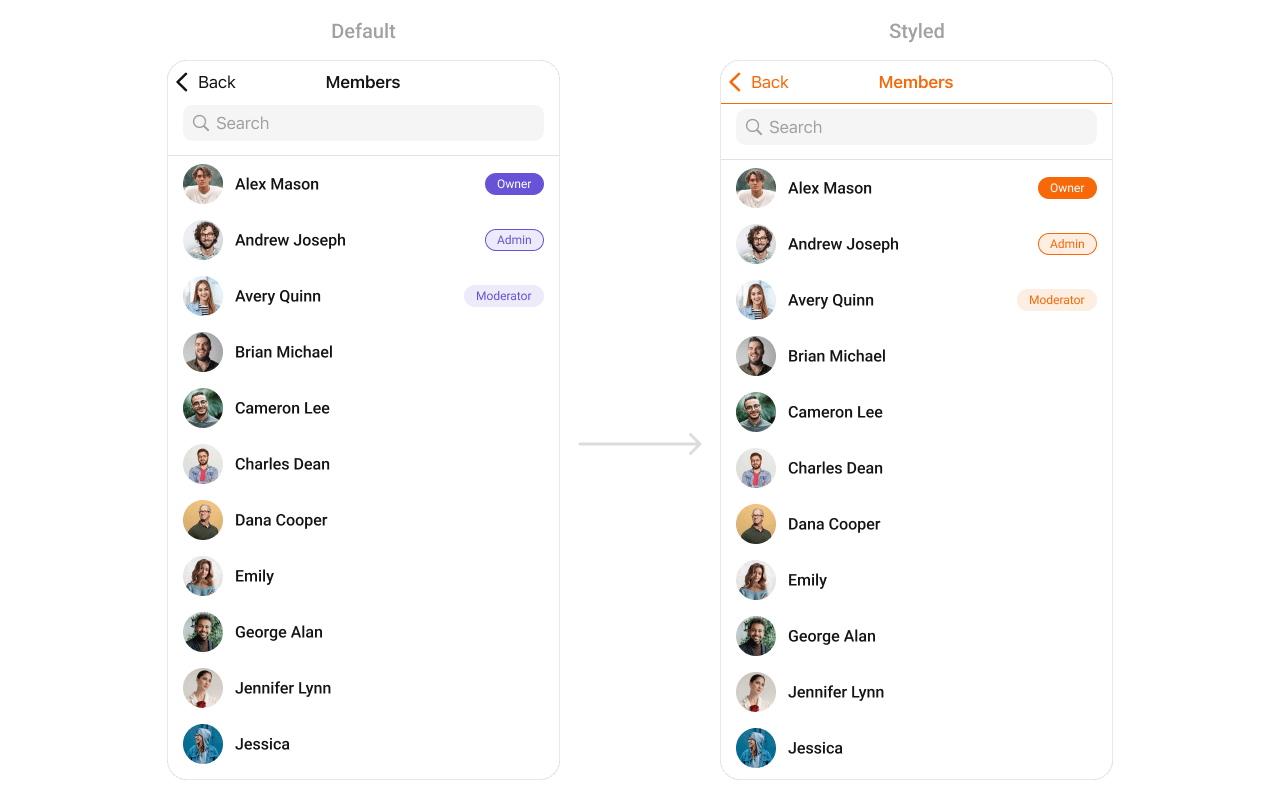
Styling
Style Hierarchy
- Global styles (
CometChatGroupMembers.style) apply to all instances - Instance styles override global for specific instances
Global Level Styling
import UIKit
import CometChatUIKitSwift

// Apply global styles
CometChatGroupMembers.style.backgroundColor = UIColor.systemBackground
CometChatGroupMembers.style.titleColor = UIColor.label
CometChatGroupMembers.style.titleFont = UIFont.systemFont(ofSize: 20, weight: .bold)
CometChatGroupMembers.style.listItemTitleTextColor = UIColor.label

// Custom avatar style
let avatarStyle = AvatarStyle()
avatarStyle.cornerRadius = CometChatCornerStyle(cornerRadius: 20)
CometChatGroupMembers.avatarStyle = avatarStyle
Instance Level Styling
import UIKit
import CometChatUIKitSwift

var customStyle = GroupMembersStyle()
customStyle.backgroundColor = UIColor(red: 0.95, green: 0.95, blue: 0.97, alpha: 1.0)
customStyle.titleColor = UIColor.darkGray
customStyle.listItemBackground = UIColor.white

let groupMembers = CometChatGroupMembers(group: group)
groupMembers.style = customStyle
Key Style Properties
| Property | Type | Default | Description |
|---|---|---|---|
backgroundColor | UIColor | CometChatTheme.backgroundColor01 | Background color |
titleColor | UIColor | CometChatTheme.textColorPrimary | Navigation title color |
titleFont | UIFont | CometChatTypography.Heading4.medium | Navigation title font |
listItemTitleTextColor | UIColor | CometChatTheme.textColorPrimary | Member name color |
listItemTitleFont | UIFont | CometChatTypography.Heading4.medium | Member name font |
listItemSubTitleTextColor | UIColor | CometChatTheme.textColorSecondary | Subtitle color |
listItemBackground | UIColor | .clear | List item background |
Customization Matrix
| What to change | Where | Property/API | Example |
|---|---|---|---|
| Background color | Style | backgroundColor | UIColor.systemBackground |
| Title appearance | Style | titleColor, titleFont | Custom colors and fonts |
| List item look | Style | listItemBackground | UIColor.white |
| Avatar appearance | Style | avatarStyle | AvatarStyle() with custom radius |
| Hide search | Property | hideSearch | groupMembers.hideSearch = true |
| Hide kick option | Property | hideKickMemberOption | groupMembers.hideKickMemberOption = true |
| Custom row | View Slot | set(listItemView:) | See Custom View Slots |
Props
All props are optional exceptgroup. Sorted alphabetically.
avatarStyle
Customizes the appearance of member avatars in the list.| Type | AvatarStyle |
| Default | AvatarStyle() |
import CometChatUIKitSwift

let groupMembers = CometChatGroupMembers(group: group)

let avatarStyle = AvatarStyle()
avatarStyle.cornerRadius = CometChatCornerStyle(cornerRadius: 20)
avatarStyle.backgroundColor = UIColor.systemBlue.withAlphaComponent(0.1)

groupMembers.avatarStyle = avatarStyle
group (required)
The group whose members to display.| Type | Group |
| Required | true |
groupMembersRequestBuilder
Custom request builder for filtering members.| Type | GroupMembersRequest.GroupMembersRequestBuilder? |
| Default | nil |
hideBackIcon
Hides the back button in the navigation bar.| Type | Bool |
| Default | false |
hideBanMemberOption
Hides the ban member option in swipe actions.| Type | Bool |
| Default | false |
hideErrorView
Hides the error state view.| Type | Bool |
| Default | false |
hideKickMemberOption
Hides the kick member option in swipe actions.| Type | Bool |
| Default | false |
hideLoadingState
Hides the loading state indicator.| Type | Bool |
| Default | false |
hideNavigationBar
Hides the entire navigation bar.| Type | Bool |
| Default | false |
hideScopeChangeOption
Hides the role change option in swipe actions.| Type | Bool |
| Default | false |
hideSearch
Hides the search bar.| Type | Bool |
| Default | false |
hideUserStatus
Hides online/offline status indicators.| Type | Bool |
| Default | false |
selectionMode
Sets the selection mode for multi-select functionality.| Type | SelectionMode |
| Default | .none |
statusIndicatorStyle
Customizes the appearance of online/offline status indicators.| Type | StatusIndicatorStyle |
| Default | StatusIndicatorStyle() |
import CometChatUIKitSwift

let groupMembers = CometChatGroupMembers(group: group)

let statusIndicatorStyle = StatusIndicatorStyle()
statusIndicatorStyle.backgroundColor = UIColor.systemGreen
statusIndicatorStyle.borderWidth = 2
statusIndicatorStyle.borderColor = UIColor.white

groupMembers.statusIndicatorStyle = statusIndicatorStyle
Events
| Event | Payload | Fires when |
|---|---|---|
ccGroupMemberKicked | User, Group | A member is kicked |
ccGroupMemberBanned | User, Group | A member is banned |
ccGroupMemberScopeChanged | User, Group, MemberScope | A member’s role is changed |
Methods
Swipe Action Methods
set(options:)
Sets custom swipe actions for group member list items, replacing the default options. These options appear when the user swipes on a member cell.@discardableResult
public func set(options: ((_ group: Group, _ member: GroupMember?) -> [CometChatGroupMemberOption])?) -> Self
| Parameter | Type | Description |
|---|---|---|
options | ((Group, GroupMember?) -> [CometChatGroupMemberOption])? | Closure that returns an array of swipe action options for a member |
import UIKit
import CometChatUIKitSwift
import CometChatSDK

let groupMembers = CometChatGroupMembers(group: group)

groupMembers.set(options: { group, member in
    var options = [CometChatGroupMemberOption]()

    // Add message option
    let messageOption = CometChatGroupMemberOption(
        id: "message",
        title: "Message",
        icon: UIImage(systemName: "message"),
        backgroundColor: .systemBlue,
        onClick: { member, group, section, option, controller in
            let messages = CometChatMessages()
            messages.set(user: member)
            controller.navigationController?.pushViewController(messages, animated: true)
        }
    )
    options.append(messageOption)

    // Add remove option
    let removeOption = CometChatGroupMemberOption(
        id: "remove",
        title: "Remove",
        icon: UIImage(systemName: "trash"),
        backgroundColor: .systemRed,
        onClick: { member, group, section, option, controller in
            print("Remove member: \(member.name ?? "")")
        }
    )
    options.append(removeOption)

    return options
})
add(options:)
Adds additional swipe actions to the existing default options.@discardableResult
public func add(options: ((_ group: Group, _ member: GroupMember?) -> [CometChatGroupMemberOption])?) -> Self
| Parameter | Type | Description |
|---|---|---|
options | ((Group, GroupMember?) -> [CometChatGroupMemberOption])? | Closure that returns additional swipe action options to append |
import UIKit
import CometChatUIKitSwift
import CometChatSDK

let groupMembers = CometChatGroupMembers(group: group)

groupMembers.add(options: { group, member in
    var options = [CometChatGroupMemberOption]()

    // Add promote option
    let promoteOption = CometChatGroupMemberOption(
        id: "promote",
        title: "Promote",
        icon: UIImage(systemName: "arrow.up.circle"),
        backgroundColor: .systemGreen,
        onClick: { member, group, section, option, controller in
            print("Promote member: \(member.name ?? "")")
        }
    )
    options.append(promoteOption)

    return options
})
Data Manipulation Methods
add(groupMember:)
Adds a new group member to the list.@discardableResult
public func add(groupMember: GroupMember) -> Self
| Parameter | Type | Description |
|---|---|---|
groupMember | GroupMember | The group member to add to the list |
import CometChatUIKitSwift
import CometChatSDK

let groupMembers = CometChatGroupMembers(group: group)

// Add a member programmatically
let newMember = GroupMember(uid: "user-123", groupMemberScope: .participant)
newMember.name = "John Doe"
groupMembers.add(groupMember: newMember)
update(groupMember:)
Updates an existing group member in the list.@discardableResult
public func update(groupMember: GroupMember) -> Self
| Parameter | Type | Description |
|---|---|---|
groupMember | GroupMember | The group member with updated information |
import CometChatUIKitSwift
import CometChatSDK

let groupMembers = CometChatGroupMembers(group: group)

// Update a member's information
if var existingMember = memberToUpdate {
    existingMember.scope = .admin
    groupMembers.update(groupMember: existingMember)
}
remove(groupMember:)
Removes a group member from the list.@discardableResult
public func remove(groupMember: GroupMember) -> Self
| Parameter | Type | Description |
|---|---|---|
groupMember | GroupMember | The group member to remove from the list |
import CometChatUIKitSwift
import CometChatSDK

let groupMembers = CometChatGroupMembers(group: group)

// Remove a member from the UI
groupMembers.remove(groupMember: memberToRemove)
insert(groupMember:at:)
Inserts a group member at a specific index in the list.@discardableResult
public func insert(groupMember: GroupMember, at index: Int) -> Self
| Parameter | Type | Description |
|---|---|---|
groupMember | GroupMember | The group member to insert |
index | Int | The position at which to insert the member |
import CometChatUIKitSwift
import CometChatSDK

let groupMembers = CometChatGroupMembers(group: group)

// Insert a member at the top of the list
let newMember = GroupMember(uid: "user-456", groupMemberScope: .participant)
newMember.name = "Jane Smith"
groupMembers.insert(groupMember: newMember, at: 0)
clearList()
Removes all group members from the list.public func clearList()
import CometChatUIKitSwift

let groupMembers = CometChatGroupMembers(group: group)

// Clear all members from the list
groupMembers.clearList()
size()
Returns the number of group members currently in the list.public func size() -> Int
import CometChatUIKitSwift

let groupMembers = CometChatGroupMembers(group: group)

// Get the count of members
let memberCount = groupMembers.size()
print("Total members: \(memberCount)")
Selection Properties
onSelectedItemProceed
Callback that fires when the user proceeds with selected members in selection mode. This is typically triggered when the user taps a “Done” or “Proceed” button after selecting members.| Type | (([GroupMember]) -> Void)? |
| Default | nil |
import CometChatUIKitSwift
import CometChatSDK

let groupMembers = CometChatGroupMembers(group: group)
groupMembers.selectionMode = .multiple

groupMembers.set(onSelectedItemProceed: { [weak self] selectedMembers in
    print("Proceeding with \(selectedMembers.count) selected members")

    for member in selectedMembers {
        print("Selected: \(member.name ?? "")")
    }

    // Perform action with selected members
    self?.handleSelectedMembers(selectedMembers)
})
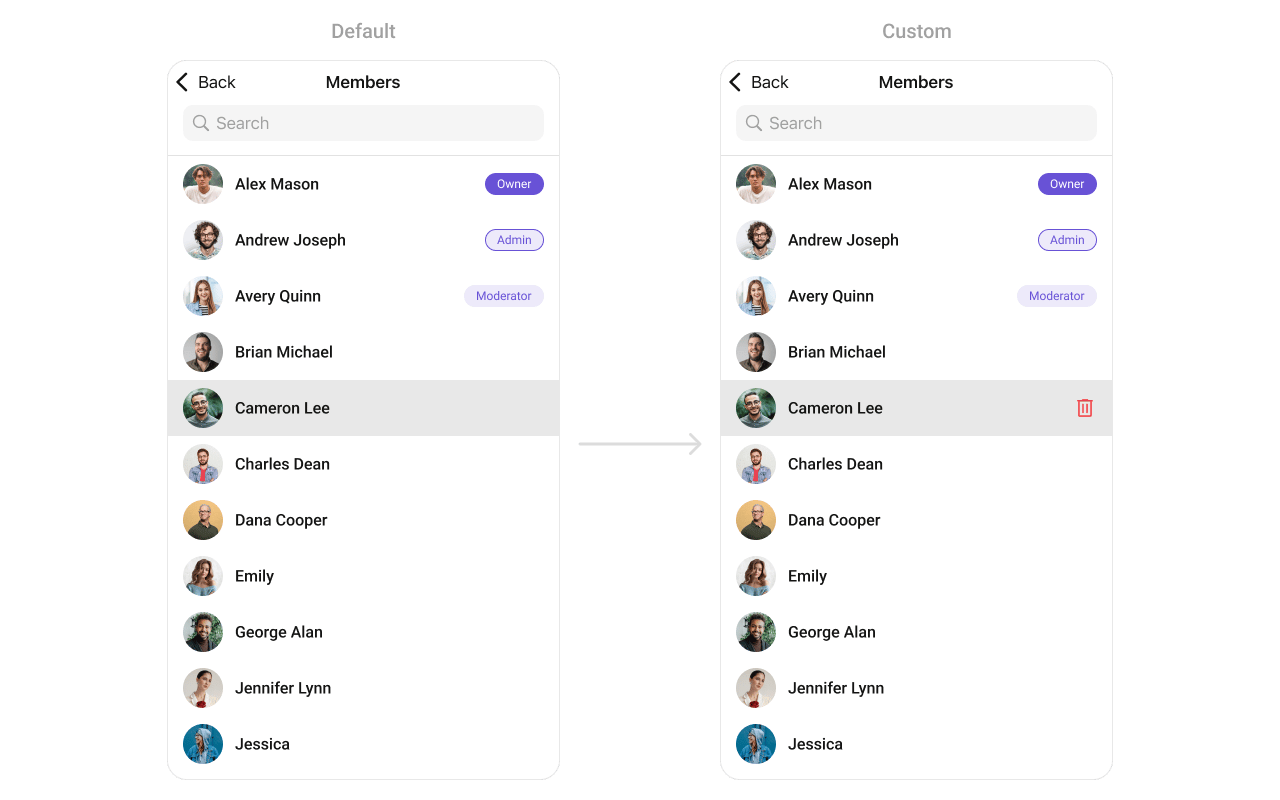
Custom Swipe Options
Add custom actions when swiping on a member:import UIKit
import CometChatUIKitSwift
import CometChatSDK
let groupMembers = CometChatGroupMembers(group: group)
let deleteOption = CometChatGroupMemberOption(
id: "delete",
title: "Remove",
icon: UIImage(systemName: "trash"),
backgroundColor: .systemRed,
onClick: { member, group, section, option, controller in
print("Remove \(member.name ?? "")")
// Implement remove logic
}
)
let messageOption = CometChatGroupMemberOption(
id: "message",
title: "Message",
icon: UIImage(systemName: "message"),
backgroundColor: .systemBlue,
onClick: { member, group, section, option, controller in
let messages = CometChatMessages()
messages.set(user: member)
controller.navigationController?.pushViewController(messages, animated: true)
}
)
groupMembers.setOptions(options: { group, member in
return [messageOption, deleteOption]
})
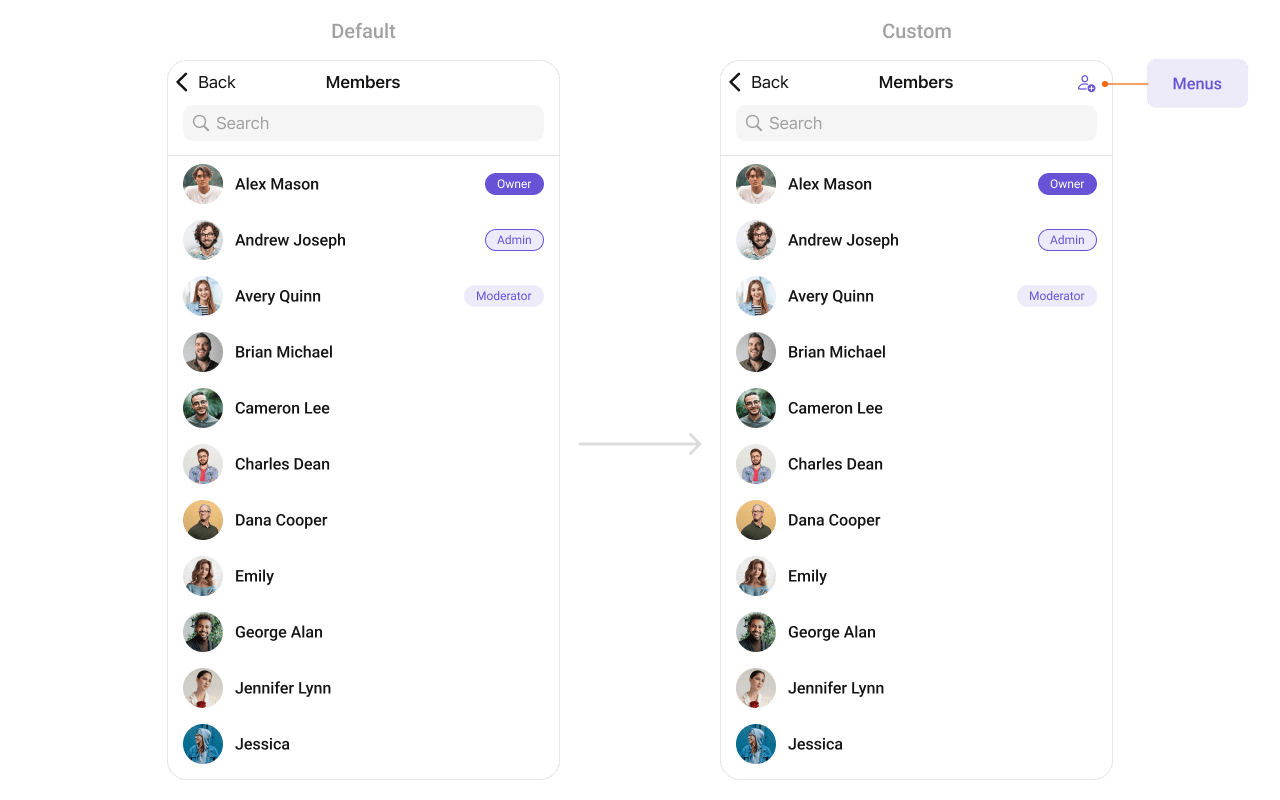
Custom Menu Buttons
Add buttons to the navigation bar:import UIKit
import CometChatUIKitSwift
import CometChatSDK
class GroupMembersViewController: UIViewController {
var group: Group!
override func viewDidLoad() {
super.viewDidLoad()
setupGroupMembers()
}
private func setupGroupMembers() {
let groupMembers = CometChatGroupMembers(group: group)
let addButton = UIBarButtonItem(
image: UIImage(systemName: "person.badge.plus"),
style: .plain,
target: self,
action: #selector(addMemberTapped)
)
groupMembers.set(menus: [addButton])
let navController = UINavigationController(rootViewController: groupMembers)
present(navController, animated: true)
}
@objc func addMemberTapped() {
// Show add member screen
let addMembers = CometChatAddMembers(group: group)
navigationController?.pushViewController(addMembers, animated: true)
}
}
Common Patterns
Admins and moderators only
let adminBuilder = GroupMembersRequest.GroupMembersRequestBuilder(guid: group.guid)
    .set(scopes: ["admin", "moderator"])

let groupMembers = CometChatGroupMembers(group: group, groupMembersRequestBuilder: adminBuilder)
Hide management options for participants
let groupMembers = CometChatGroupMembers(group: group)
groupMembers.hideKickMemberOption = true
groupMembers.hideBanMemberOption = true
groupMembers.hideScopeChangeOption = true
Custom empty state
let groupMembers = CometChatGroupMembers(group: group)

groupMembers.set(emptyStateView: {
    let label = UILabel()
    label.text = "No members in this group"
    label.textAlignment = .center
    return label
})
Multi-select members
let groupMembers = CometChatGroupMembers(group: group)
groupMembers.selectionMode = .multiple

groupMembers.set(onSelection: { selectedMembers in
    print("Selected \(selectedMembers.count) members")
    // Kick selected members, change scope, etc.
})
Related Components
- Groups - List all groups
- Messages - Display messages in a group
- Add Members - Add new members to a group
- Banned Members - View banned members
- Transfer Ownership - Transfer group ownership